
Inside Embiro
One profile. Three ways to make an introduction.
Why we built Team Studio to connect business cards, email signatures and personal contact pages—and what we learned about the details between them.
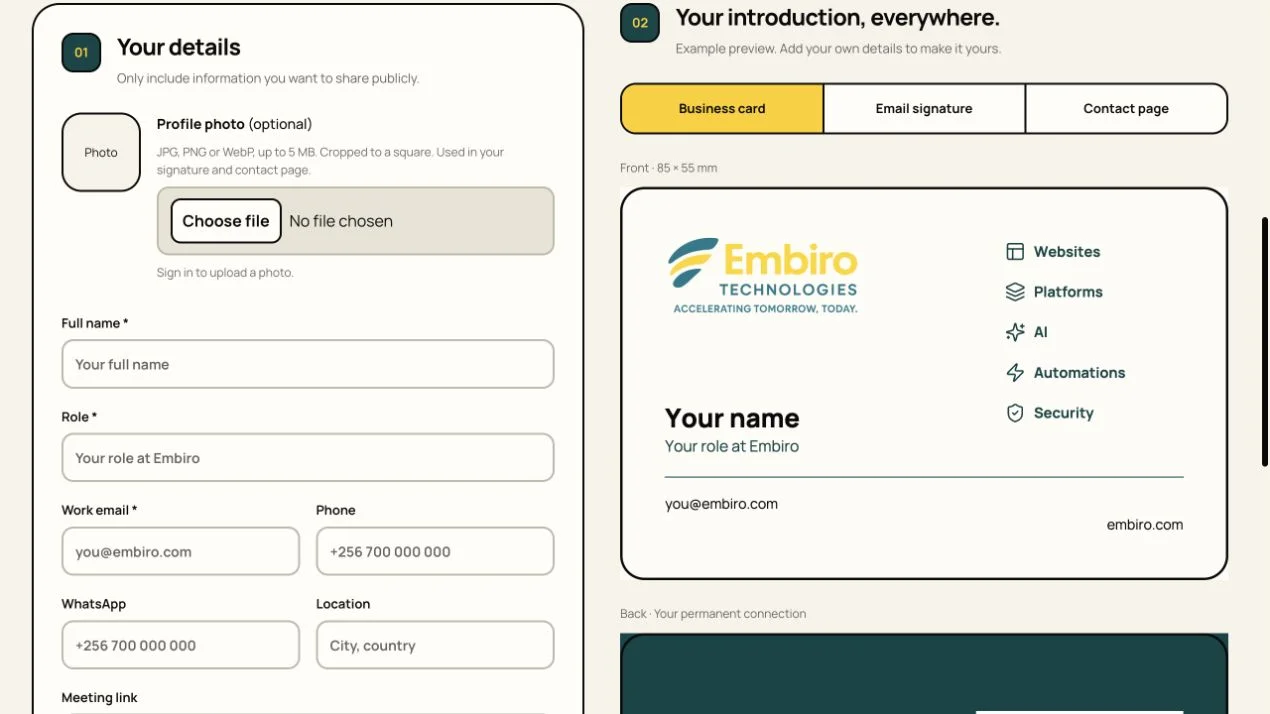
The small friction of introducing yourself
A new team member needs a business card. Their email needs a signature. Someone they meet needs a way to save their details or book a conversation. Each item is small, but producing them separately creates several places for the same information to drift.
We built Team Studio around one profile. A team member enters their details and can see how those details appear on a business card, in an email signature and on a personal contact page. The same source supports all three introductions.
The aim is practical consistency. The name, role and contact details should agree wherever somebody encounters them. The brand should remain recognisable without each person having to recreate a layout from scratch.
Connect the card to something useful
The back of the business card includes a QR code leading to the person’s contact page. That page brings together their contact details and meeting link, so the printed card can be a route into a useful digital introduction.
We chose memorable public links based on the first-name part of the work email. A link that a person can read or remember is useful alongside a QR code. It also makes the destination easier to recognise before opening it.
There is a distinction between printing and publishing. A team member should check the contact page and its links before sharing a card. If details change later, the public page can be updated; the information physically printed on the card still needs a new export.
- Business card: a physical introduction, with a QR route to the contact page.
- Email signature: the same identity in everyday correspondence.
- Contact page: a place to find details and take the next step.
Enter it once
Use one profile for the name, role and contact details.
Check each introduction
Review the card, email signature and contact page before sharing.
Publish, then share
Check the public destination before printing a card that links to it.
The preview is a promise
One of the important refinements came from a simple observation: the downloaded PDF needed to match the business card preview. A preview that looks right is not enough if the exported file moves the spacing, changes the appearance or drops an element.
We aligned the card preview and PDF output and checked the published version. The download is also named for the person whose card it is. That small detail makes a difference when several team members’ files are being prepared together.
Email introduces a different constraint. A signature needs to survive the limitations of email software, not just look good in a modern browser. The signature uses a conservative layout and hosted images, with a plain-text alternative. Some recipients may still block images, which is why the contact information should remain useful as text.
Give people a private place to get it right
A profile should not become public simply because someone started filling in a form. Team Studio separates saving a draft from publishing a contact page. A person can prepare their details and photo, inspect the outputs and choose when to share them.
The form, preview, download and public destination all need to agree.
Authorised team administrators can also prepare profiles on behalf of colleagues. That supports the everyday work of coordinating cards and signatures without requiring each person to design their own assets.
Team Studio is a small internal tool, but it illustrates a useful product principle: follow the information across the entire task. The form, preview, download and public destination all need to agree. Improving any one of them in isolation leaves the person to bridge the gaps.